
AI does the maths.
You make the move.
Decide where to open, expand or invest — on data, not instinct. Pick a place, choose what you want to know, and K-Stra returns the numbers.
Watch the video0:15- Businesses mapped
- 2M+
- Property listings
- 400K+
- Data hosted in
- Sydney
- Road-network isochrones
- < 0.1 s
Businesses: K-Stra places catalogue, Australia, updated monthly (October 2026) · Property listings: sale and rental listings, Australia, collected since July 2026 and updated monthly · Isochrones: 50–100 ms for a drive of up to two hours, on the road network.
K-Stra is the geomarketing app that turns any Australian address, drive-time area or postcode into the numbers behind your next move — people, income, spending, competitors and property — in seconds, with AI doing the maths. Exploring is free without an account; analyses start from 2 credits.
Don’t learn the software.
Just ask.
Type the question in plain English. The app opens with your question in the assistant: it builds the catchment, ticks the indicators and stops at the price — nothing runs until you say go.
How the assistant works0 / 300
What happens when you ask in the app:
- Catchment built · 10 min by car · Double Bay
- People & Economy · 5 topics selected
- Awaiting your go · 10 credits
- 2 free answers without an account, then 0.5 credits each.
- Paid analyses are prepared and priced; they run with a free account (40 credits).
- Questions and the analysis on screen go to Google Gemini (US). Details
Write your question from a computer: the app is designed for desktop screens.
Where. What. Decide.
Flight plan · 3 stages- Stage 01
Where
Type an address, draw an area or pick a postcode. The bands follow the real roads.
Free - Stage 02
What
Tick what you want to know: people, markets, property, your own data.
Free - Stage 03
Decide
See the estimated cost, confirm, then read the map, the KPIs and the tables.
10 credits for five topics
A radius is a guess. People decide on travel time.
Drag the line and see how many customers the guess gets wrong.
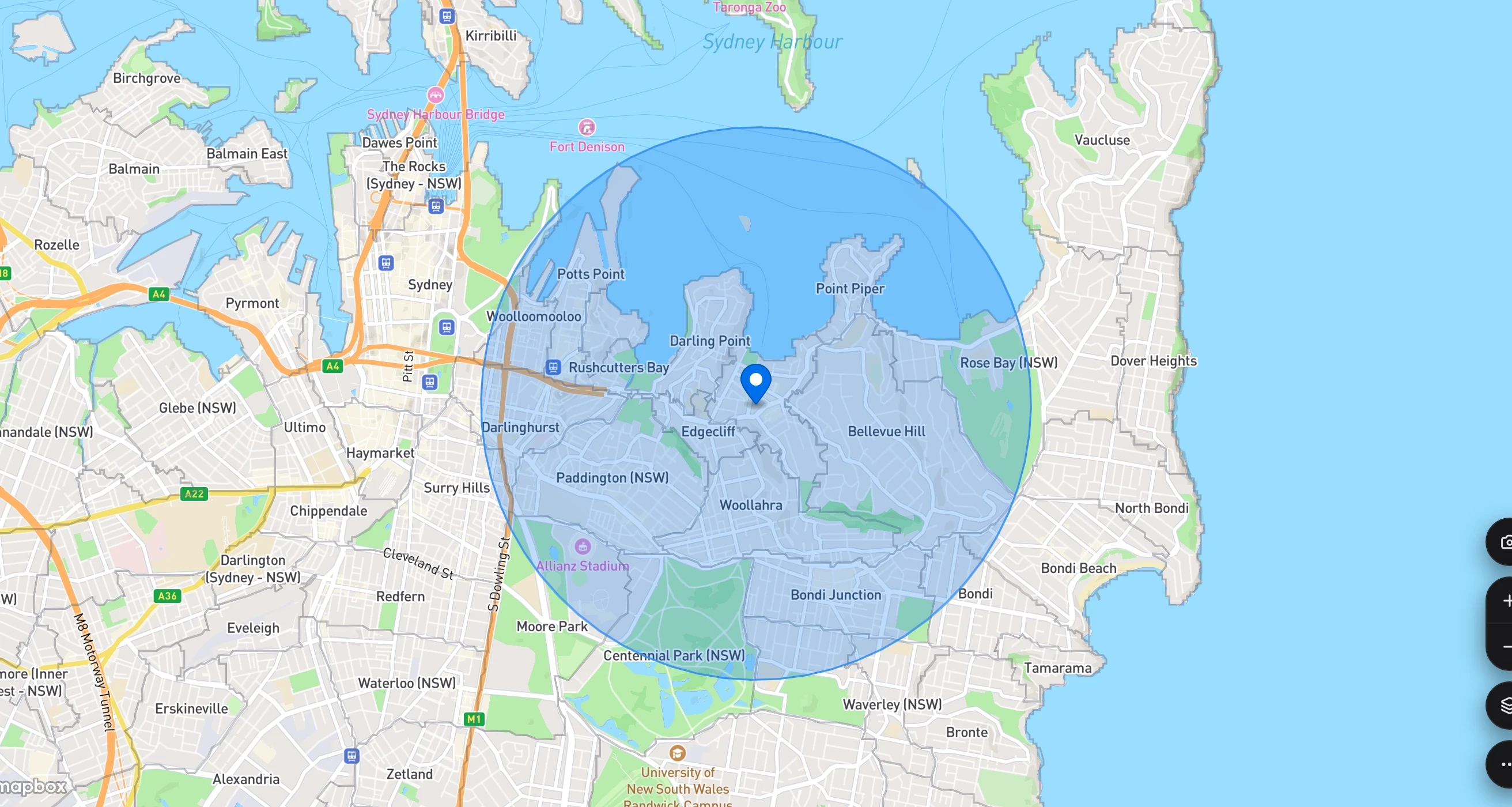
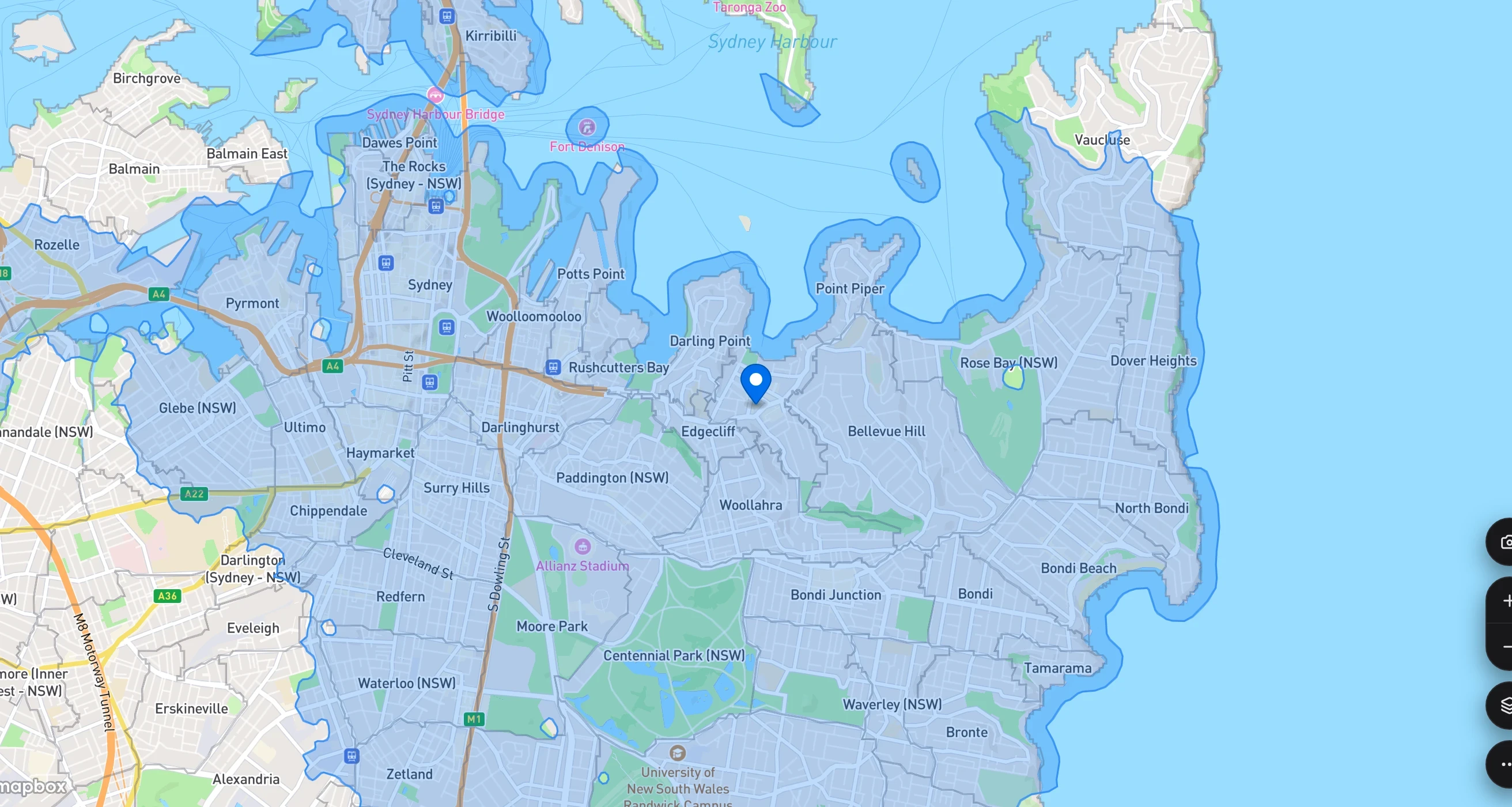
Same address (20 Knox Street, Double Bay, NSW), same map zoom; drive time by car in normal traffic. Residents: ABS population estimates 2024, spread onto addresses with the Census 2021 mesh, summed over the area each method covers. K-Stra analysis of 7 October 2026.
Counted address by address, in milliseconds.
Population estimates are spread onto 14.5 million address points, weighted by the size of each building. A band adds up the addresses it reaches — not a slice of a suburb.
Drive-time areas are computed with Dijkstra’s algorithm on the real road network — one-way streets, bridges, motorways — in milliseconds. It is where the name K-Stra comes from.
The edge of a band passes between one street number and the next. Nobody is counted for living in a park, and nobody is cut in half.
Everything on one screen.
The setup on the left, the answer on the right, the map in between — and the assistant one click away.
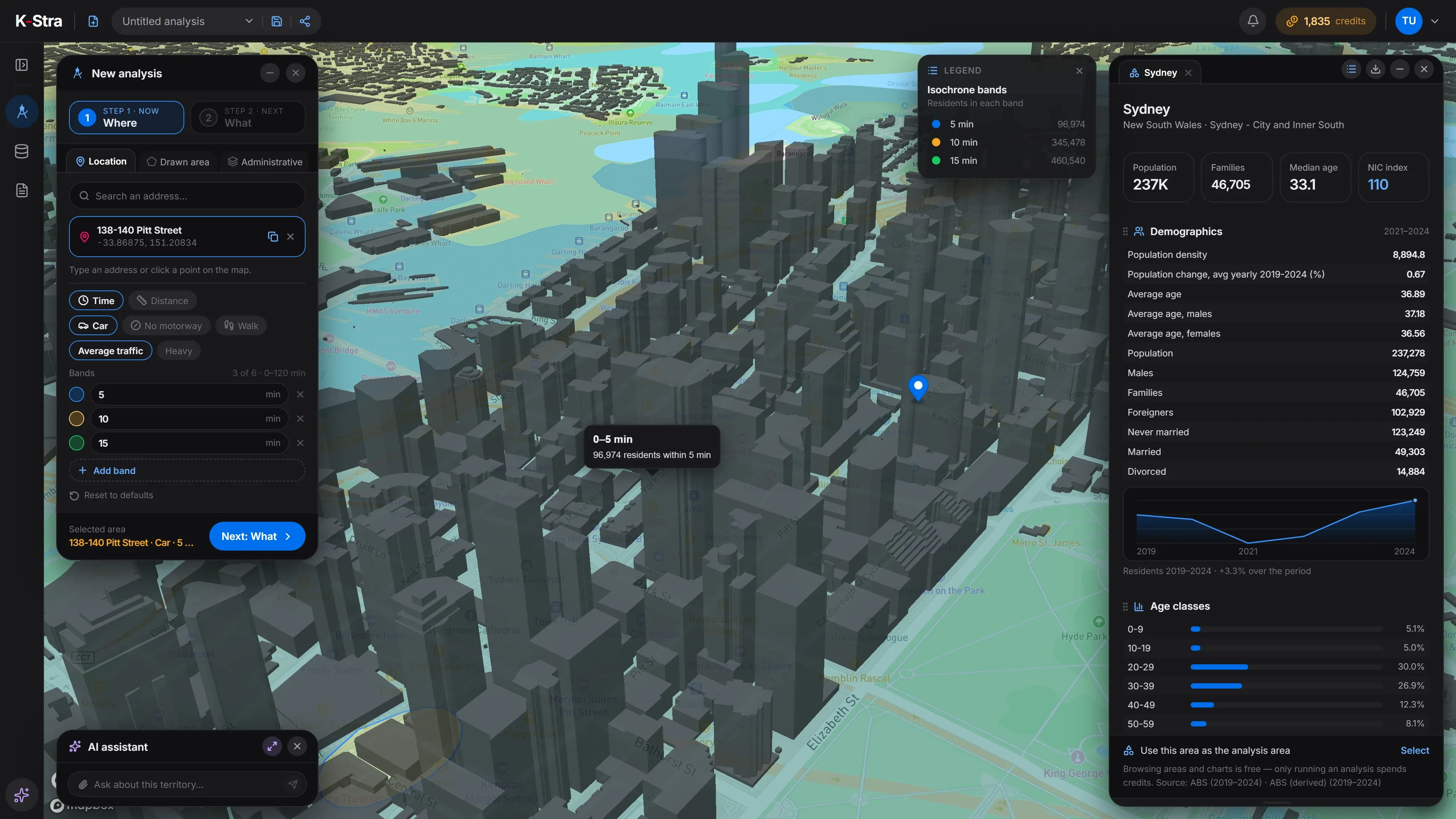
- 1Where & WhatAddress, bands and the indicators you tick.
- 2ResultsKPI cards, compact tables and the legend.
- 3Map & legendIsochrone bands with the residents in each one.
- 4AI assistantAsk, and it works on the same analysis.
Designed for desktop screens of 1280 pixels and wider: on a phone you can read the site, the app opens best on a computer.
Try it on your own address.
Free to explore, no account needed. You see the cost before anything runs.
- 1Open the app: the 5, 10 and 15-minute bands are already set
- 2Type your address in the search box
- 3Read who lives in each band on the free area dashboard
Five layers.
One map.
National data, competitors, travel time and your own records on the same map — and the AI reads the whole stack for you.
- 05 · Your dataStores and customers from My Data
- 04 · Travel timeIsochrones on the road network
- 03 · CompetitorsMarkets & Brands, by sector
- 02 · People & incomeAddress-level data, themed by area
- 01 · BasemapRoads, places, coastline
Your data stays yours. Your analyses stay in Australia.
Hosted in Sydney
K-Stra runs on a dedicated server in Sydney: your datasets, your analyses and your results stay in Australia. The few steps that use outside providers are listed one by one.
Your data remains yours
Every organisation’s data is kept apart. Mark a dataset “session only” and it is deleted 24 hours after upload.
AI under your control
The assistant works with your permissions and asks before it spends a single credit.
Transparent costs
You see the estimate first. A failed run charges nothing, and Retry does not charge again.
Frequently asked questions
What do you think K-Stra means? The answer is here.
What you can do for freeWhere is my data stored?
On a dedicated server in Sydney: your datasets, your analyses and your results stay in Australia. Map tiles, payments and sign-in use outside providers but never see your analysis data. Three steps can: geocoding (only the address text, and only when you confirm), the AI assistant and email notifications. See every external step.
Do I need an account to try K-Stra?
No. Without an account you can explore the map, draw drive-time areas and open the free dashboard of any administrative area. To run an analysis you sign up free, with no card, and start with 40 credits.
What does an analysis cost?
It depends on what you ask, not on the size of the area: People & Economy costs 2 credits per topic, a Markets & Brands sector 40 credits and a Real Estate analysis 20. You see the estimate before anything runs. See pricing.
Which areas does K-Stra cover?
Australia, from the whole country down to the street address, across nine administrative levels — states, SA4, councils, postcodes, SA3, suburbs, SA2 and SA1. New Zealand and the Pacific islands are being mapped, with no release date announced yet.
Can I upload my own customer data?
Yes. Upload a CSV or Excel file of stores, customers or loyalty cards and analyse it with the national data. An import costs 1 credit per 10,000 rows; addresses without coordinates are geocoded at 1.5 credits per 1,000. A dataset marked “session only” is deleted 24 hours after upload.
Can I try a demo of K-Stra?
Yes, and there is no demo to book: the app itself is the demo. Every free account, with no card, gets 40 credits precisely to try the platform with real analyses on your own addresses.
Stop guessing.
Start analysing.
Explore without an account. Sign up free — no card — and get 40 credits.
Open the app — free to exploreYou only spend when an analysis runs