
How do K-Stra credits work?
One unit of work, priced in advance, spent only on results.
A credit is the unit K-Stra uses to price work, and every analysis shows its price in credits before it runs. That price depends on what you choose — topics, sectors, brands, stores, sales reps — never on the size of the area, and credits are charged only when results are delivered.
What exactly is a credit?
Think of it as prepaid work on Australian data. Buying credits and spending them are separate moments: you top up once or with a plan, then each analysis draws from the same balance.
One balance per organisation
Everyone in the company draws from the same balance. There is no per-seat licence, and a colleague who joins brings no extra cost.
Limits per team and per person
Owners can set monthly ceilings that follow the billing cycle. They are spending limits on the shared balance, not separate wallets to fill.
Never below zero
If an analysis costs more than the balance or a limit allows, it does not start and nothing is charged.
How is the price of an analysis calculated?
Each module has one rule, and the quantity is always something you pick in the What step. Plans and packs change the price of a credit, never the number of credits an action costs.
People & Economy is priced per topic, a Markets & Brands sector per sector, Customer Loyalty per store, Sales per sales rep, imports per 10,000 rows and geocoding per 1,000 addresses. The full tariff, action by action, is on the pricing page.
See the full tariffWhat does a typical run cost?
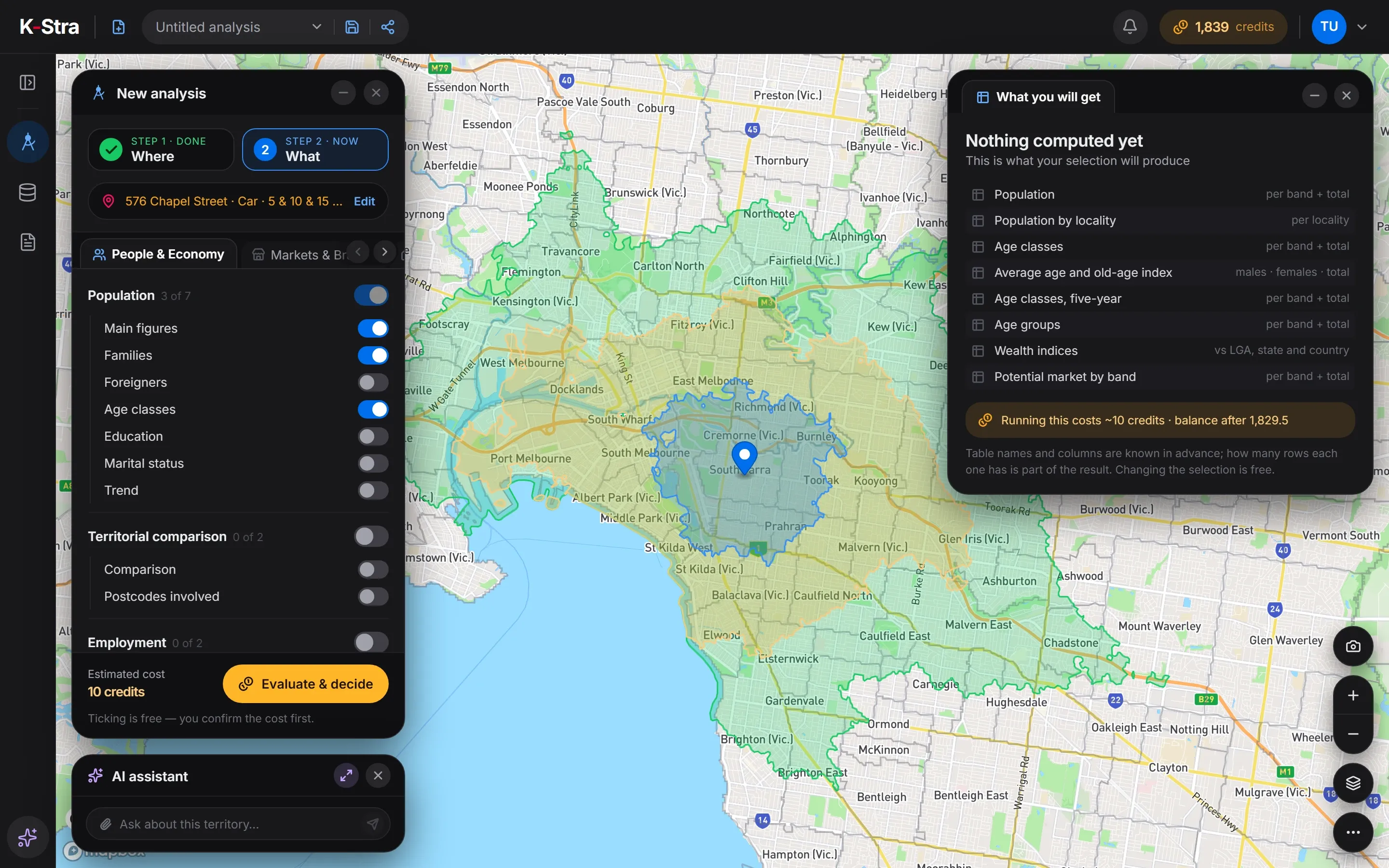
A café chain checks one address: 5 People & Economy topics and one sector of Markets & Brands, to see the competition around it.
The area could be a 10-minute drive or a whole state: the price stays the same, because the territory is never part of the price of an analysis.
When are credits charged — and when not?
A charge is not a single event. It happens in up to four moments, so you never pay for something you did not receive.
- Step 01
Quote
You press Evaluate & decide. The server prices the exact setup with the current tariff and shows the cost in a confirmation window. A quote is free.
- Step 02
Hold
When you confirm, the quoted credits are reserved. They leave the available balance but are not spent yet, so two runs at the same time cannot use the same credit.
- Step 03
Commit
When the results are delivered, the hold becomes a charge and the run is saved as a version of your analysis.
- Step 04
Release
If the run fails or is interrupted, the hold is cancelled and the balance goes back to what it was.
- A failed or interrupted run charges nothing, and Retry never charges twice.
- Reopening a saved analysis, or any earlier version of it, is free.
- Geocoding and imports are charged pro rata: if you stop half way, you pay for the rows processed and keep them.
- Update analysis reruns the same setup on fresh data and costs the same as the first run.
- Refreshing a Dynamic report pays each source analysis once, even when it feeds several tables and charts.
What does it cost to keep my datasets in K-Stra?
The first 50 MB are free. Beyond that, dataset storage costs 2 credits per 100 MB a month, on the average of the month, charged on the 1st of the following month.
In the last week of the month, if the expected charge is higher than the available balance, the app warns you. Topping up in time keeps every dataset working.
Datasets are suspended: they stay in My Data, where you can rename or delete them, but cannot be used on the map or in analyses. After 90 days of suspension they are deleted, with an email a week before, and the unpaid charge is written off.
Which credits are spent first?
The ones closest to expiry. The credits panel shows how many credits expire next and when, and an email arrives one week before any credits expire.
Free monthly top-ups expire quietly at the end of the month, with no email. Cancelling a plan does not shorten anything: its credits stay until their own expiry date.
How long each kind of credit lasts — packs, plans, welcome credits and the monthly top-up — is listed on the pricing page.
Expiry of each kind of creditWhat if something was charged by mistake?
Every movement of credits is written to a ledger that cannot be edited, with the operation, the person, the team and the amount. The balance you see is recalculated from that ledger, so every charge can be traced.
If a charge looks wrong, open Account → Support and choose “Something was charged by mistake?”. Support checks the log of that operation and returns the credits when the charge was an error.
What happens if I run out of credits while setting up an analysis?
Nothing is lost. The analysis does not start, and if you have billing rights the button opens the purchase window; otherwise the app asks you to contact an administrator. If a team or personal limit is the block, the message says so.
Can I see where our credits went?
Yes. The Usage window lists every operation with its module, target, credits and result, shows spending by week, by module, by team and by person, and exports the log. Reading it is free.
Do analyses cost the same through the API?
Yes. Every way in — the app, the AI assistant and the API — charges the same credits for the same analysis. The one exception is a drive-time area on its own: free in the app, 3 credits per call through the API. The API asks for a quote before every charged run. See the developer documentation.
Why was a geocoding job charged less than its quote?
Because progressive jobs are charged for the work actually done. If the job is stopped, or some rows turn out not to need geocoding, only the rows processed are charged and the rest of the hold is released.
How are fractional costs rounded?
The total of a run is rounded up to a whole credit. The AI assistant is the exception: its answers round to a tenth, so an answer costs 0.5 credits.
Price it before
you run it.
Set up an analysis and press Evaluate & decide: the quote costs nothing, and nothing runs until you confirm.
Open the app — free to exploreThe quote is always free