Pick a place, choose what you want to know, see the price, decide. Everything else in K-Stra serves those three steps.
In short
K-Stra is a geomarketing workspace that runs in the browser: pick a place, choose what to measure, check the price and decide. Five analysis modules, an AI assistant, your own data and free exports work on the same Australian data, spread down to 14.5 million address points.
Every analysis follows the same path in the app’s left-hand panel. The first two steps are free; credits are spent only in the third, after you have seen the price.
Step 01
Where
Type an address or click the map, draw one or more areas, or pick up to 12 administrative areas. Travel bands follow the real roads: up to 6 bands from 0 to 120 minutes, by car, by car without motorways or on foot — or in kilometres along the road.
Free
Step 02
What
Choose a module and switch on the indicators you need. Switching costs nothing, and the footer of the panel shows the estimated cost as you go.
Free
Step 03
Evaluate & decide
Confirm the price and read the result as KPI cards, tables, charts and a themed map.
From 2 credits
The What step
What can you analyse with K-Stra?
The What step offers the modules below. Each one has its own price, shown before anything runs, and you can add several to the same area.
People & Economy
Population, families, age classes, education, marital status, employment, income and spending, homes (owned or rented, dwelling type, cars), population trend and a comparison with the council, the state and Australia.
Search by sector or by brand. See demand, supply and opportunity for a sector, the best five locations, store density, and how your network covers the area against competitors.
Asking prices and rents estimated from sale and rental listings, by postcode: price per m², gross yield, trends as an index and a reliability score for every sample.
Your loyalty-card customers placed on the map: where each store really draws from, plus its market share and penetration calculated on your card data, distance decay and loyalty by area.
Sales reps, customers and prospects from your files: the territory each rep covers, weighted coverage, overlaps between reps and reassignment of customers straight from the map.
People Mobility, built on real movement flows, and Tourism Accommodation are announced but not part of K-Stra today. No release date has been set.
Demand and supply
How does K-Stra measure demand and supply in an area?
People & Economy measures demand: who lives in the area and how much they can spend. Markets & Brands measures supply: the stores already competing for that spending. Together they show where a sector still has room to grow.
Demand
Who lives there, and how much they spend
Residents, families, ages, income and spending power from ABS data, counted on 14.5 million address points.
Opportunity is where demand outweighs supply: for each consumer sector, a spending model sets the two against each other, colours the gap on the map and lists the five best locations.
The software
What does the K-Stra workspace look like?
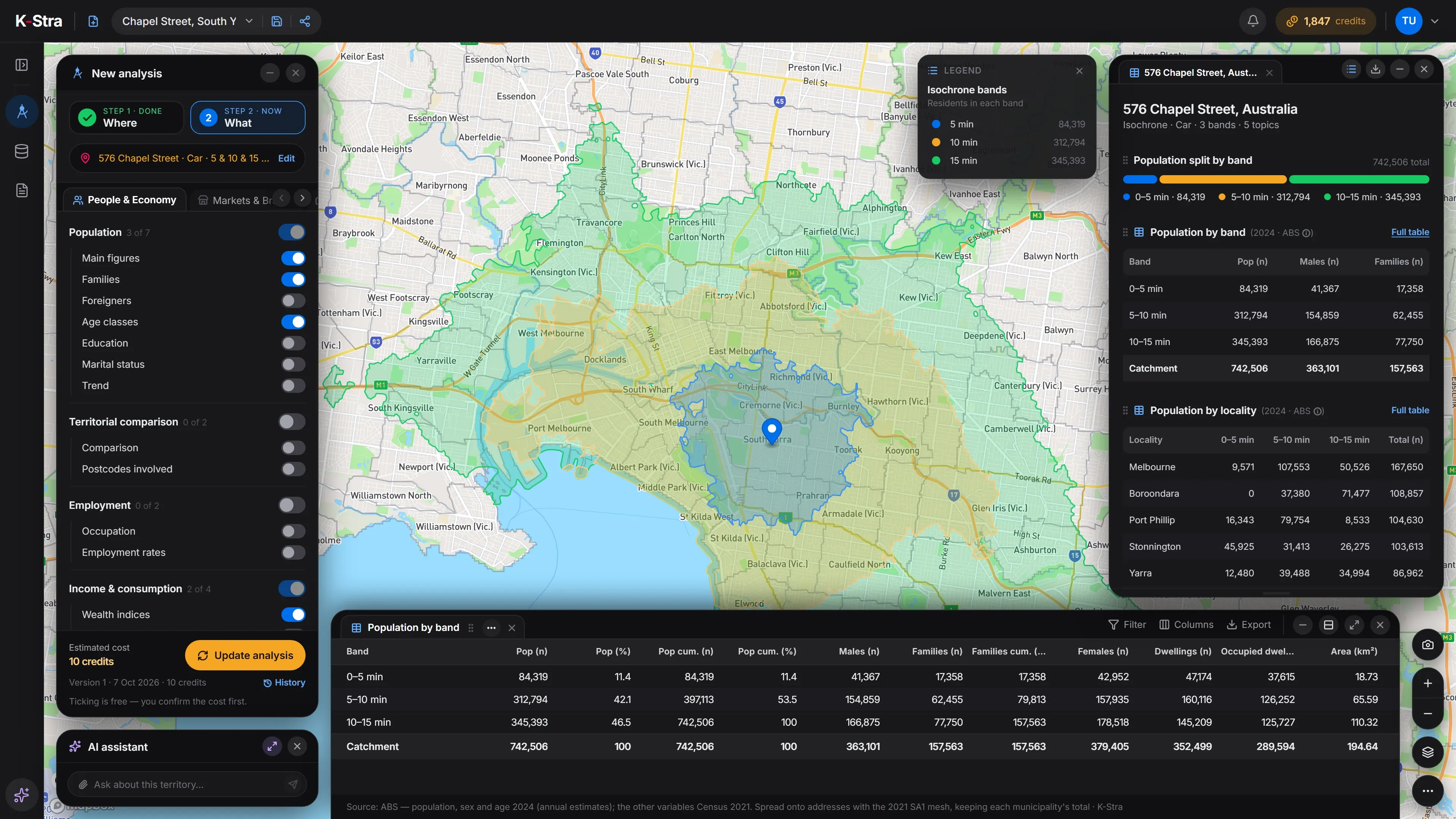
Setup on the left, results on the right, the map in between and the full table underneath: the thread between a question and its numbers stays on one screen.
k-stra.com/a
The K-Stra workspace during an analysis: the setup panel, the map with the travel bands, the KPI panel and the full data table.
Beyond the analysis
What else comes with every K-Stra account?
Analyses are the part you pay for. Most of what surrounds them is free: the area dashboard, themes, exports, sharing and reopening what you have already run. Accounts are free and start with 40 credits.
My Data
Upload stores, customers or sales reps from CSV or Excel files up to 100 MB, or from KML, KMZ and GeoJSON. Addresses without coordinates are geocoded on request, and a dataset marked “session only” is deleted 24 hours after upload.
Maps and themes
Colour your layers by value or by category — choropleth, graduated symbols or heatmap — with natural breaks, quantiles, equal intervals or manual classes. Changing a theme never re-runs an analysis, so it never spends credits.
Free area dashboard
Click a state, a council, a postcode or a suburb on the map to open its dashboard of residents, ages and income. It is free, with or without an account.
Free exports
Results export to PDF, Excel, CSV and KML at no cost: an export reads results you have already paid for, it does not run anything again.
Lay out tables, charts and map views from your analyses in A4 or presentation format, from a template. Export to PDF, PowerPoint, Excel or HTML, share a link, or send it on a schedule with frozen or refreshed figures. An AI first draft costs 10 credits.
Every paid run is saved as a version of the analysis and reopens for free. Share it with your team, your organisation, named people or anyone with the link: they read the results, and if they run it again it becomes their own analysis.
API and MCP
The actions of the app are also available through a public REST API and an MCP server, with a personal API key that spends your organisation’s credits. Paid actions are quoted first and run only at the quoted price.
No. K-Stra runs in a recent desktop browser at k-stra.com/a/. It is designed for screens 1280 pixels wide or more and shows a notice on screens narrower than 1024 pixels.
Can several people in my company use the same account?
Yes. An organisation has one credit balance shared by its teams and users, with optional monthly limits per team and per person, so adding a colleague adds no seat fee. Roles decide who manages members, analyses and datasets.
What happens to an analysis after it has run?
It is saved with a name, and every paid run becomes a version of it. Reopening a version shows the results you paid for at no cost; running it again with fresh data costs the same as the first run.
Can I share an analysis with someone outside my company?
Yes: add people by email or open it to anyone with the link, with an optional expiry date. They see the analysis as it is now. If they run it again, the run is saved as their own analysis and uses their credits, not yours.
Can K-Stra connect to our own systems or AI agents?
Yes. A public REST API and an MCP server expose the same actions as the app, authenticated with a personal API key. Paid actions return a quote first and run only at that price. Read the developer documentation.
Which modules are not available yet?
People Mobility, based on real movement flows, and Tourism Accommodation are coming soon. They are not part of K-Stra today, and no release date has been announced.
Next step
See it on your own address.
No card and nothing to install: open the app in your browser, type a real address and read who lives around it.