
How do you share a location analysis in K-Stra?
An analysis is useful when the people who decide can open it. Sharing, versions and map images are free.
Every saved K-Stra analysis has one link, its own address. You choose who can open it: your team, your organisation, named people by email, or anyone with the link, even without an account. Opening it never spends credits, and a new run by the person who opens it uses their own credits.
Who can open a shared K-Stra analysis?
An analysis is private to the person who made it until they share it. The share window has four switches that work independently, and the link is always the same address.
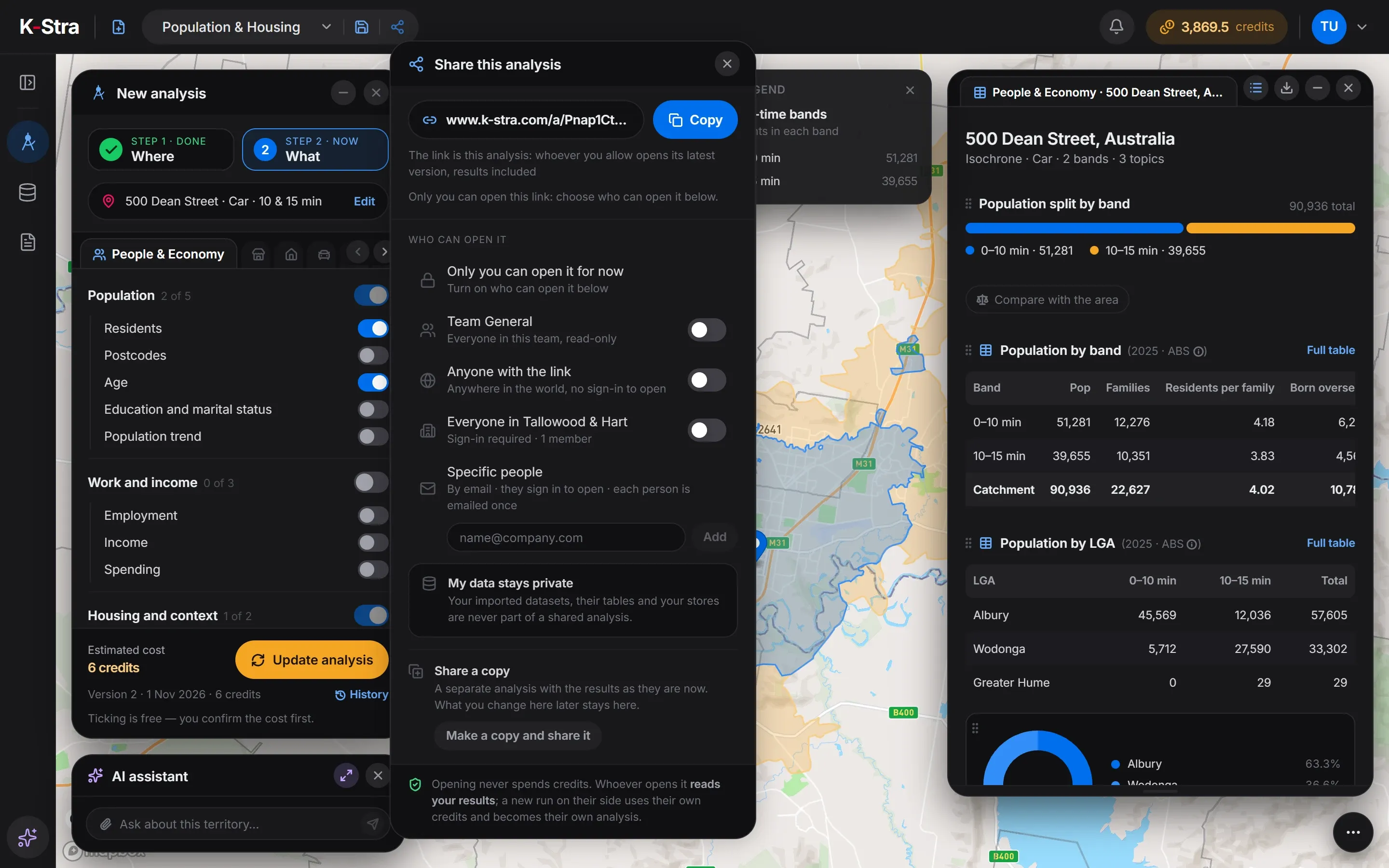 Share this analysis
| Option | Who opens it | Sign-in | Lasts |
|---|---|---|---|
| Your team | Everyone in the team, read-only | Yes | Until you switch it off |
| Anyone with the link | Anyone anywhere who has the address | No | 7 days, 30 days or never |
| Your organisation | Every member of the organisation | Yes | Until you switch it off |
| Specific people | Up to 50 people by email, each emailed once | Yes | Until you switch it off |
Whoever opens the link sees the latest version, results included, and cannot change it. A new run on their side uses their own credits and becomes their own analysis.
Share a copy works the other way round: it makes a separate analysis with the results as they are now, so what you change later does not reach the people who have the copy.
Do your datasets travel with a shared analysis?
No: the datasets you imported, and their tables, are never part of a shared analysis. The person who opens it cannot browse your files or download them.
Results calculated from your data, such as the territories of your sales reps, are part of the analysis like any other result. Check them before you switch on a link for anyone, or share a report: outside your team, its parts built on your data are removed.
How do versions of an analysis work?
Every paid run is a version, kept with its date and its cost. The example is a catchment of 10 and 15 minutes by car from 500 Dean Street, Albury NSW, run twice on 1 November 2026.
| Version | Topics of People & Economy | Credits |
|---|---|---|
| Version 1 | Residents and age | 4 |
| Version 2 | Residents, age and housing | 6 |
Adding housing to the first run meant a second run: K-Stra asked whether to update the analysis as version 2 or save a new analysis next to it. Version 1 stays in the history and reopens for free.
The catchment crosses the Murray: of 90,936 residents within 15 minutes, 57,605 live in Albury, New South Wales, 33,302 in Wodonga, Victoria, and 29 in Greater Hume. One link shows both sides of the border to whoever opens it.
K-Stra analysis of 1 November 2026, by car in average traffic. Residents: ABS Estimated Resident Population at 30 June 2025, spread onto addresses by K-Stra; councils: ABS boundaries.
On-screen text
Saved when it counts
An analysis is saved by its first run, by the save button, by renaming or by sharing it. A blue dot shows changes not saved yet.
Named for you
New analyses get a name that says what, where and when, such as a topic, a street and a date. Rename it from the bar at the top.
Newer data, your choice
When the data behind a saved analysis is updated, K-Stra says so. Update analysis runs it again at the normal price; otherwise it keeps its results.
How do you save a map image from K-Stra?
The camera button frames the map and turns it into an image, with the legend and the source on it. It never runs anything, so it never costs credits.
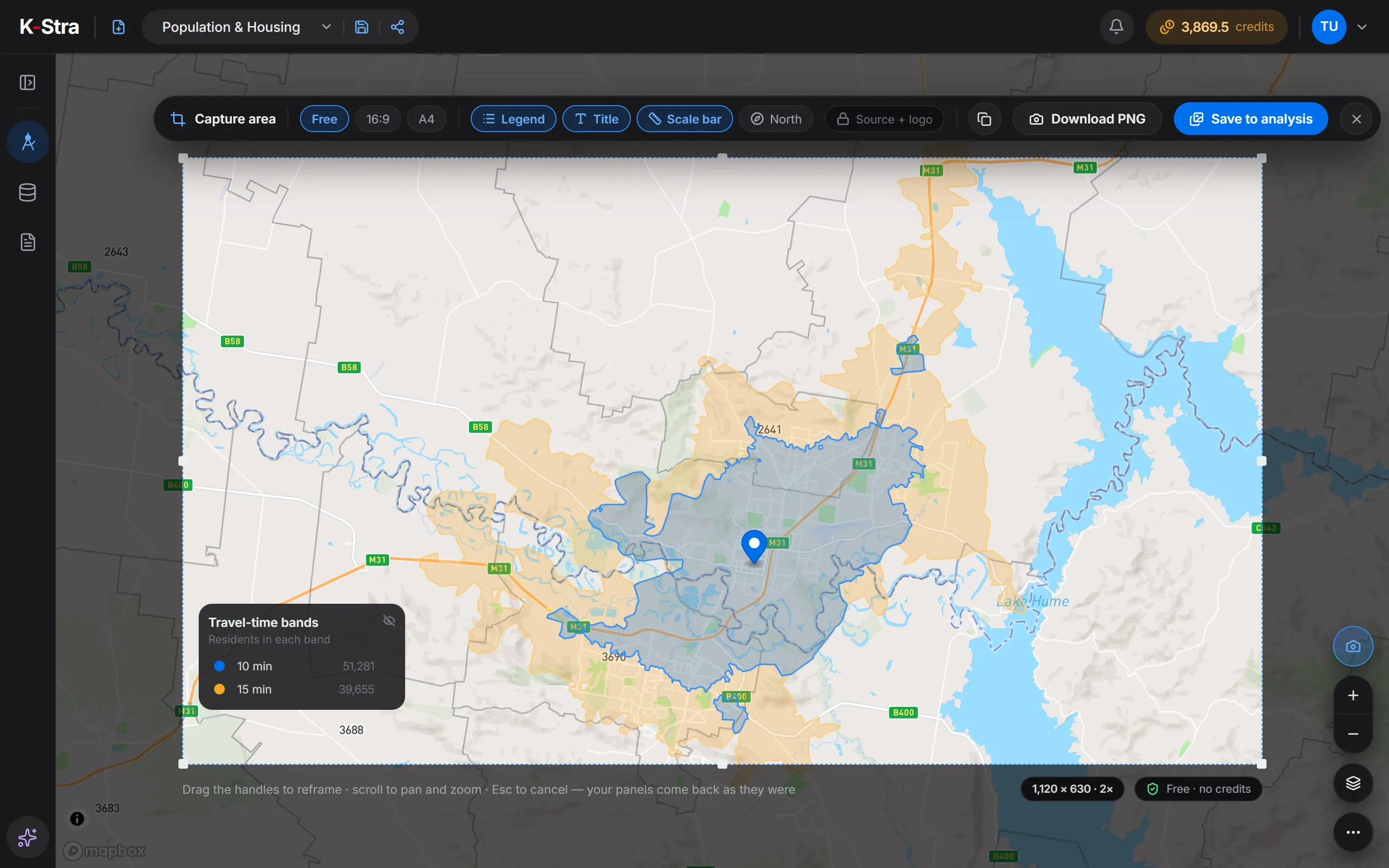 Capture the map
A PNG at double resolution
The frame starts at 1120 × 630 pixels and can be free, 16:9 or A4 landscape. Download the image or copy it to the clipboard.
What goes in the image
Legend, title and scale on by default, north arrow on request. The source note and the K-Stra logo are always included.
Views for reports
Save to analysis keeps up to 20 views with a saved analysis, ready to be placed in a report and exported to PDF or PowerPoint.
What does sharing cost?
- Sharing with your team, your organisation, named people or anyone: free.
- Opening and reading a shared analysis: free, for you and for them.
- Reopening any version of your analyses: free.
- Map images, copies and saved views: free.
Credits are spent only on new runs, by whoever starts them, after seeing the price.
Questions about sharing
Does the person I share with need a K-Stra account?
Not for a link shared with Anyone with the link: it opens in any browser without signing in, read-only. Team, organisation and named-people sharing ask the person to sign in, and running anything new needs a free account.
Who pays when someone opens my shared analysis?
Nobody: opening and reading a shared analysis never spends credits. If the person runs something new on it, the run uses their own credits and becomes their own analysis; yours stays as it was.
Can I stop sharing an analysis?
Yes. Switch off the option you turned on and the access ends; a link for anyone can also expire by itself after 7 or 30 days. To give someone a fixed picture instead, Share a copy creates a separate analysis with the results as they are now.
Do I need a paid plan to save analyses?
No, a free account is enough. An analysis is saved by its first run, with the save button, by renaming it or by sharing it, and it keeps its results with no expiry. A new account starts with 40 free credits.
Does a map image cost credits?
No. A map capture reads what is already on screen and is always free, like sharing, reopening an analysis and exporting it.
One link.
Same numbers for everyone.
Run an analysis, switch on who can open it and send the address. Opening it never costs anyone a credit.
Open the app — free to explore40 credits when you sign up · no card required