How do teams share credits and control spending in K-Stra?
One balance, clear roles and a log of every credit. Built for a team of two or a network of regional offices.
In K-Stra an organisation holds one credit balance, its data and its invoices; teams decide who sees what, and each member has a role. Owners and admins can set monthly limits for a team or a person, which cap spending on the shared balance without splitting it. There is no fee per seat.
How is a K-Stra organisation organised?
Signing up creates an organisation with you as its owner and a first team called General. The organisation owns the data and the balance; people work in it through their roles.
In the organisation
| Role | Can |
|---|---|
| Owner | Everything an admin can, plus naming other owners and closing the organisation. There is always at least one active owner. |
| Admin | Invites, suspends and removes members, creates teams, sets limits and reads the audit log. |
| Member | Works in the teams they belong to, with the role they have in each team. |
In each team
| Role | Can |
|---|---|
| Team admin | Reads and changes the team’s datasets and manages every report of the team. |
| Editor | Reads and changes the team’s datasets and manages their own reports. |
| Viewer | Reads the team’s datasets, analyses and reports shared with the team, without changing them. |
Buying credits and editing invoice details is a separate permission, Can buy credits, that owners always have and can give to others. Whoever works alone sees none of this: the team switch appears only with a second team or a second member.
People join by email invitation, as a member or an admin, with a role for the chosen teams and an optional monthly limit. The link is valid for 7 days, can be revoked at once, and works only for the invited address once it is verified.
How do you cap what a team or a person spends?
Owners and admins set a monthly limit on any team or person. A limit is a ceiling on the shared balance, not a separate wallet: whoever spends first draws from the same pool.
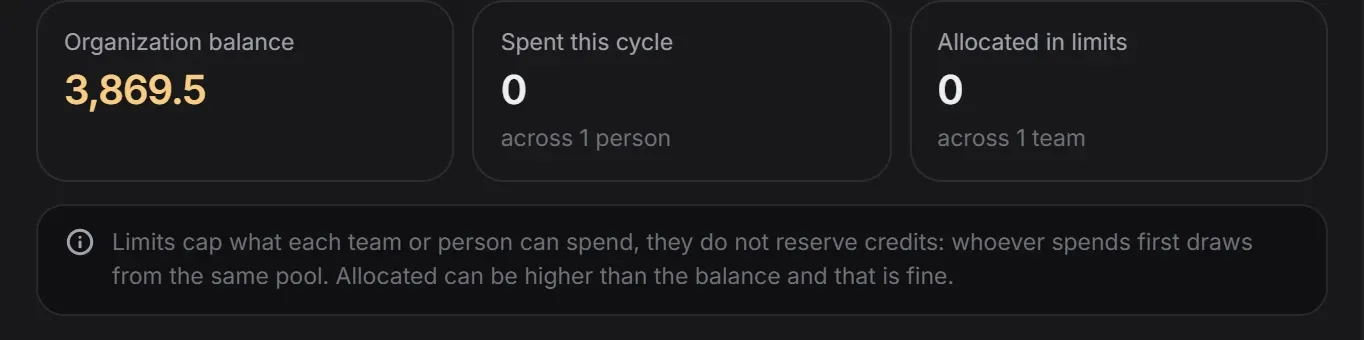 Limits & consumption
Before a run, K-Stra checks the organisation balance, then the team limit, then the personal limit. The figure in the header is the smallest of the three, so everyone sees what they can really spend.
At a limit nothing is charged, and the confirmation window says which limit stopped the run. Without the permission to buy, Request more credits notifies the owners and admins in the app and by email.
How credits workHow do you see who spent what?
The Usage window shows every operation of the organisation and its cost, for 30 days, 90 days, the last year or all time. Failed runs appear with zero credits.
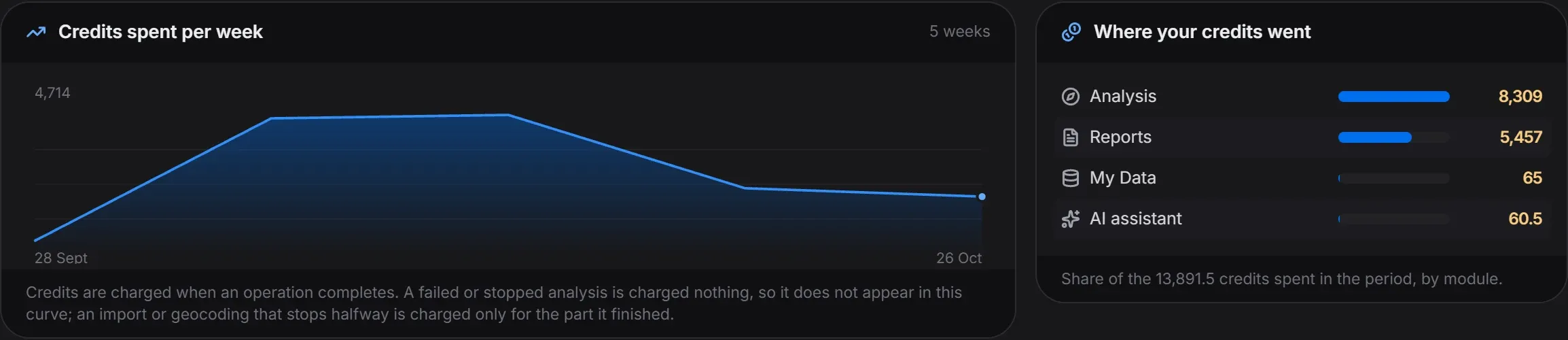 Usage
Credits spent, operations completed and failed, the average per run and the credits left, then a log with when, what, which module, who, on what and how many credits. Every member sees the organisation’s usage, and Export log downloads the period as a CSV file.
One line per change, with date, time and person: roles, the permission to buy, suspensions and removals, invitations, teams, limits, API keys, plan changes and credit requests. It is kept for 24 months and read 50 lines at a time.
Who sees the datasets, analyses and reports of a team?
Datasets
Visible to the team by default, or private to their creator, or open to named people in the team. Viewers read, editors change.
Analyses
Private to whoever made them until they share them; shared analyses are read-only. The owner of the organisation can read every analysis.
Reports
Shared with the team by default, or private. Team admins manage all of the team’s reports, editors their own.
Each organisation’s data is kept apart from every other organisation’s, on the same server in Sydney.
How do members sign in?
With a Google account, a Microsoft account from any organisation, or email and password. The email address is always verified first.
- Every password sign-in asks for a 6-digit code sent by email, valid for 10 minutes.
- Sessions last 30 days with Keep me signed in, or end when the browser closes.
- Changing the password signs out every other session.
- Suspending or removing a member ends their sessions at once.
Each member can create personal keys for the API and for AI agents, up to 20 at a time, with read, run or manage rights, an optional monthly cap and an optional expiry. A key spends the organisation’s credits within its owner’s limits.
Developer documentationSAML connections and automatic user provisioning (SCIM) are not offered today.
Questions about teams
Does K-Stra charge per user?
No. There is no fee per seat: inviting a colleague costs nothing and gives no credits. Everyone spends from the organisation’s single balance, within any monthly limit set for their team or for them.
What happens when someone reaches their limit?
The run does not start and nothing is charged; the confirmation window says which limit stopped it. A member who cannot buy credits can send a request, and owners and admins get a notification and an email.
When do monthly limits reset?
At the start of each calendar month. A limit is a ceiling, not a reserve: the credits stay in the shared balance until someone spends them.
Does K-Stra support single sign-on?
Members can sign in with a Google account or a Microsoft account from any organisation, or with email and password and a code by email. SAML connections and automatic user provisioning (SCIM) are not offered.
What happens to the work of someone who leaves?
Team datasets and shared work stay where they are. When you remove a member you choose an owner or admin who receives their private datasets and saved analyses; their past spending stays in the usage log and the audit log. Suspending access is the gentler option.
One balance.
Everyone on the same numbers.
Sign up free, invite colleagues at no cost and set a limit for each team before anyone runs a thing.
Open the app — free to explore40 credits when you sign up · no card required