
What do I need to run K-Stra?
A computer, a recent browser and nothing to install.
K-Stra runs in a web browser with nothing to install. It is designed for screens at least 1,280 pixels wide, still works from 950 pixels without the bottom data panel, and on a phone only when turned sideways. It needs a recent browser that draws maps with WebGL, and a free account only to run analyses.
What screen size does K-Stra need?
K-Stra puts the map, the setup and the results side by side, so the width of the window decides what fits. The app changes at three widths, measured in browser pixels.
| Window width | What you get | What changes | Typical devices |
|---|---|---|---|
| 1,280 px and wider | Full layout | Setup panel, results, the map, the data panel at the bottom and the AI assistant docked on the left, all on one screen. | Desktop monitors and most laptops at 100% or 125% display scaling. |
| 950 to 1,279 px | One panel at a time | The same map and results. The bottom data panel does not open, the assistant opens in a window, and the report editor hides its page thumbnails. | Small laptops, laptops at 150% scaling, tablets turned sideways. |
| Below 950 px, upright | Turn it sideways | A notice asks you to turn the phone sideways. Nothing is lost: as soon as the screen is in landscape the app is back as it was. | Phones and tablets held upright. |
| Below 760 px, sideways | Too narrow | The app stops and offers to send the link to yourself or copy it, so you can open the same screen later on a computer. | Small phones, such as the 667 px iPhone SE. |
Browser pixels are not the pixels on the box. A laptop with a 1,920-pixel screen and Windows display scaling at 150% gives the browser 1,280 pixels, the limit of the full layout. Zooming the browser out to 90% widens the window again without changing the screen settings.
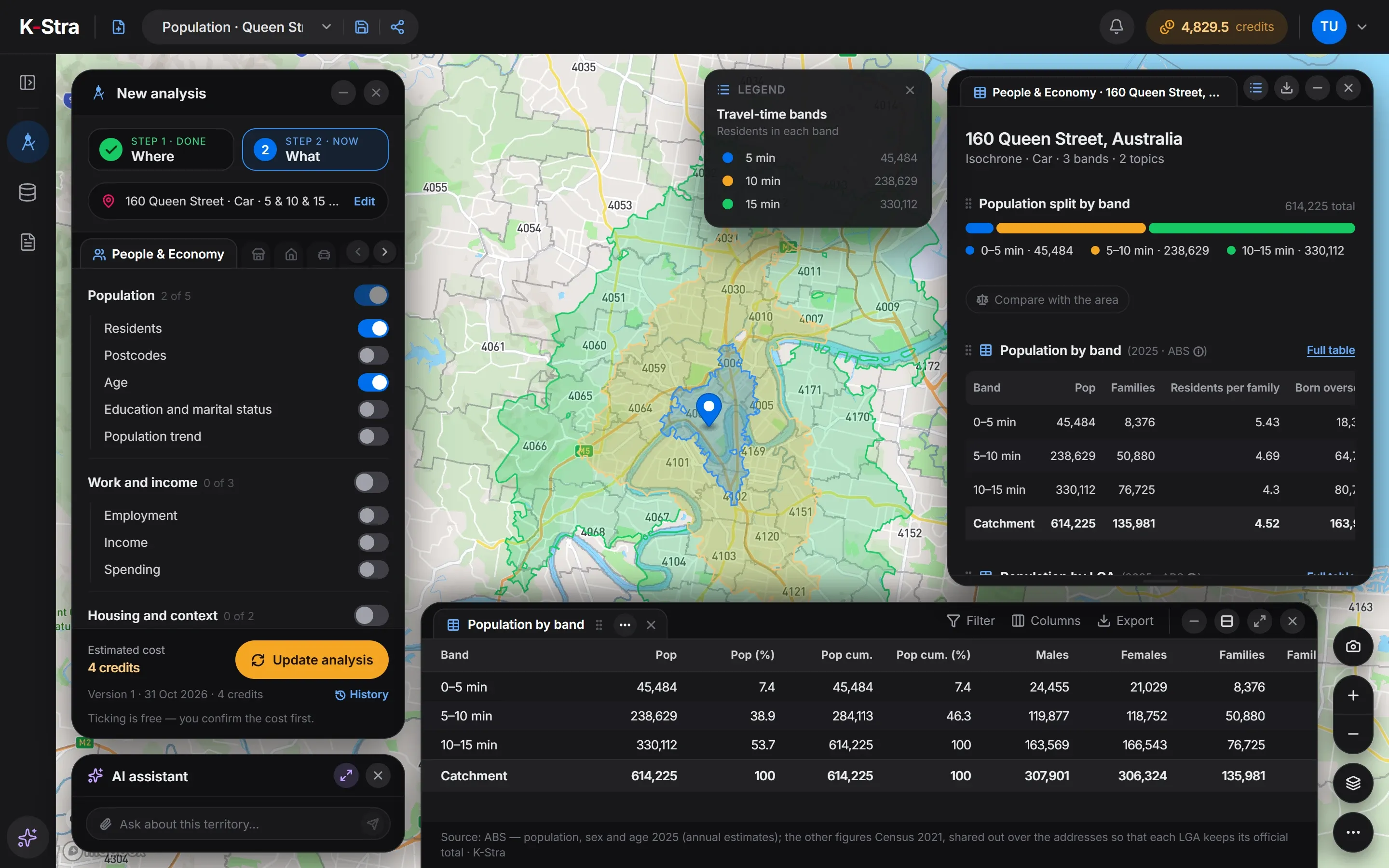 1,440 px
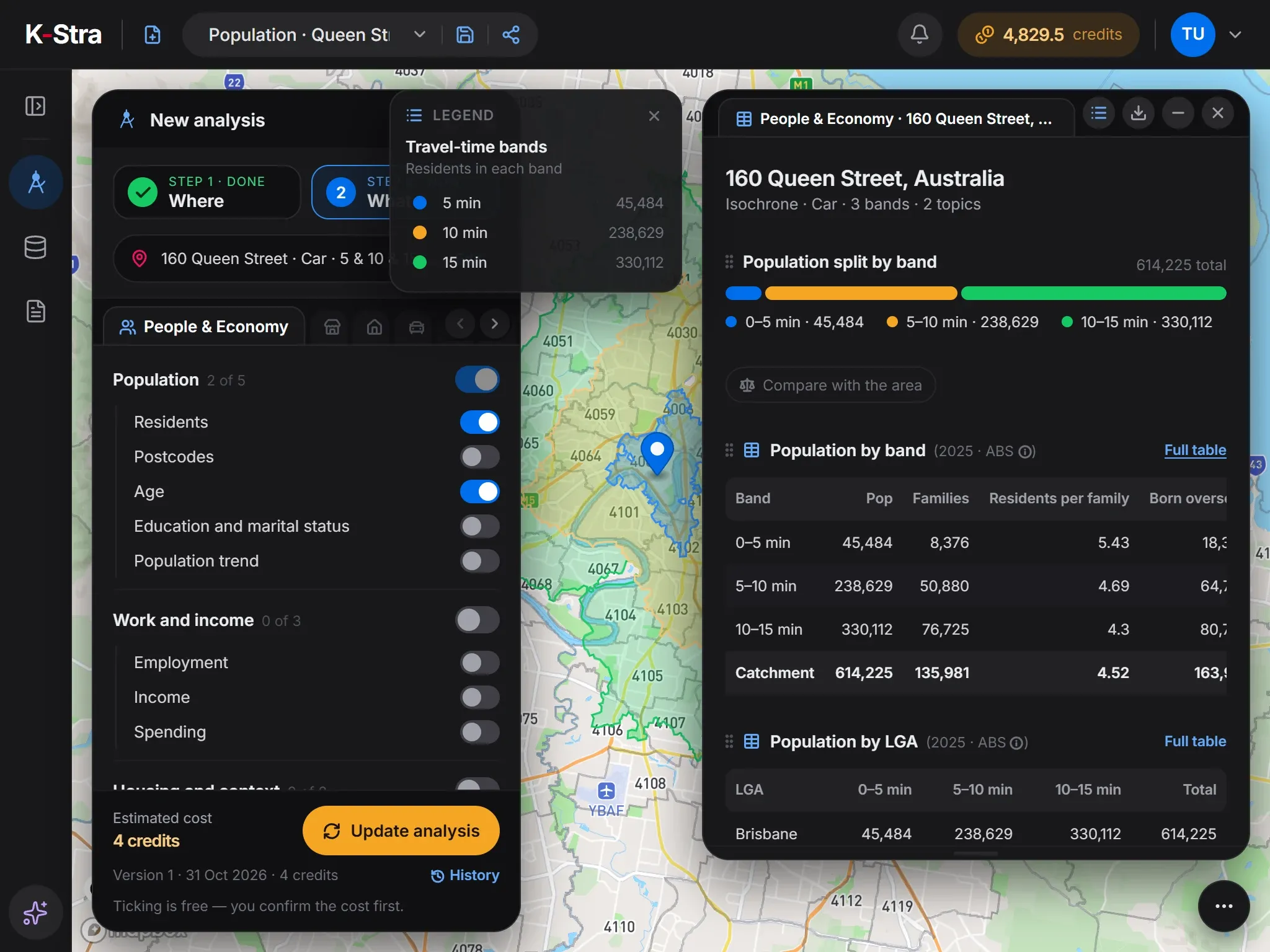 1,024 px
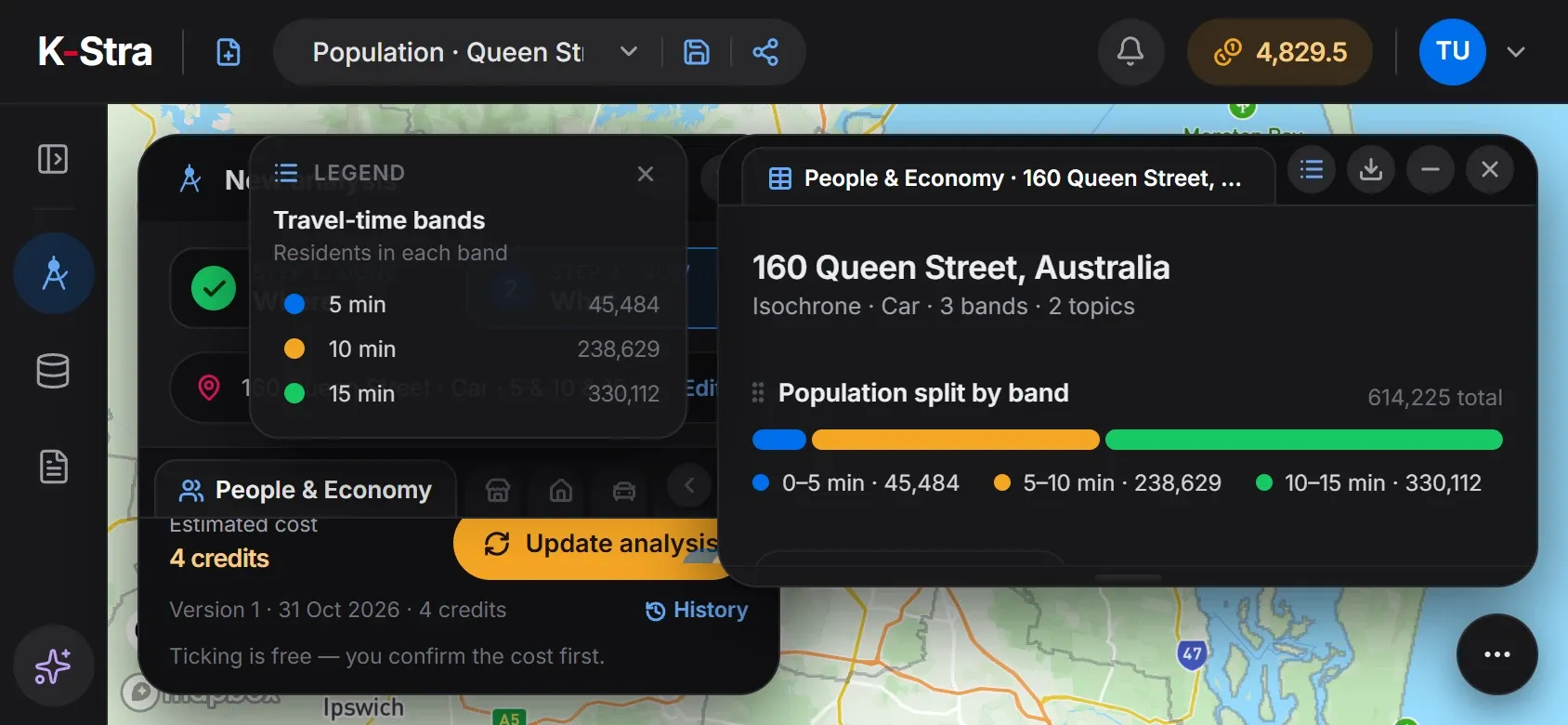 Phone, sideways
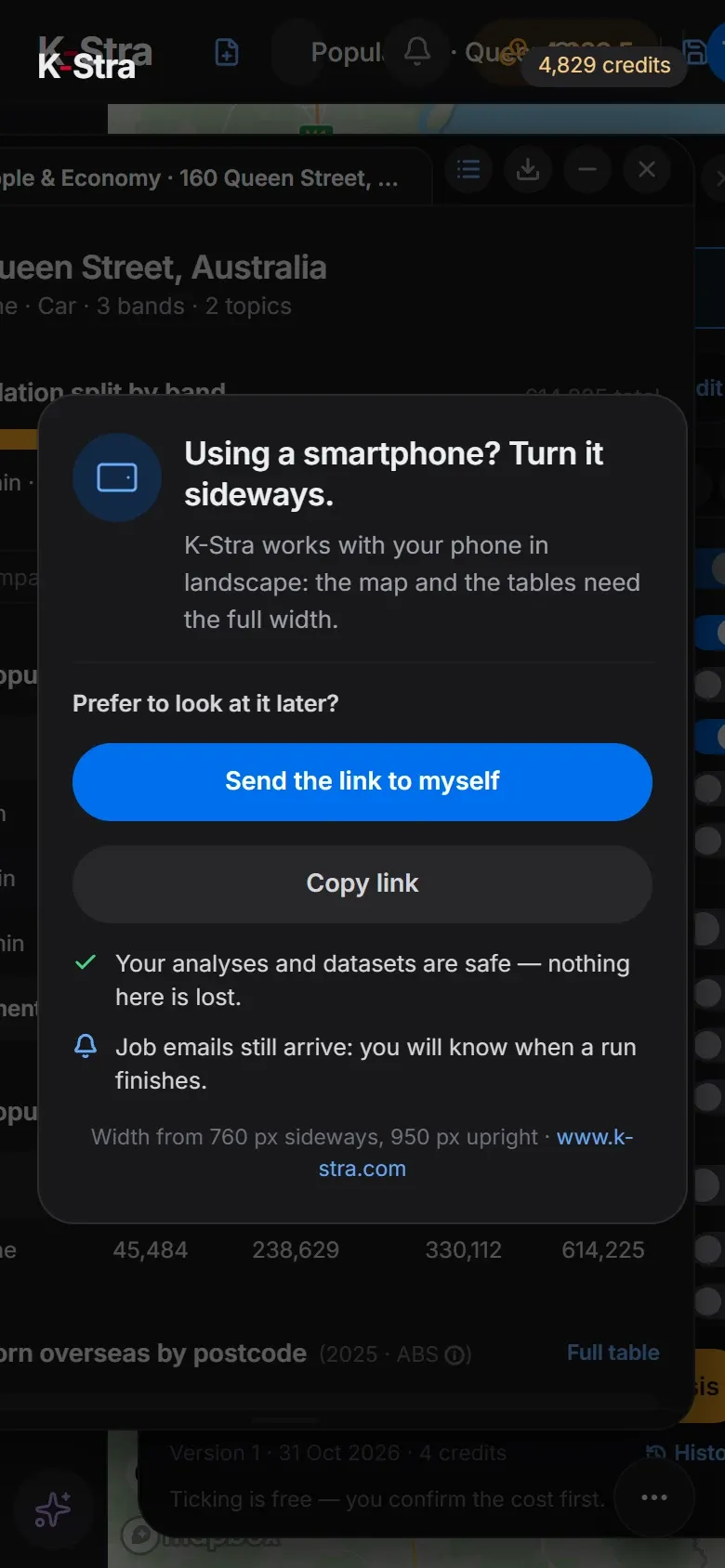 Phone, upright
Which browser does K-Stra work in?
Any recent desktop browser that supports WebGL, the graphics standard the K-Stra map is drawn with. There is no plug-in, extension or download, and no list of certified browsers: what matters is an up-to-date version with hardware acceleration turned on.
The browser must accept cookies from www.k-stra.com, which hold the sign-in session, and keep local storage for a few preferences, such as the welcome screen you have already seen.
Copying a map image straight to the clipboard needs a browser that allows it. Where it does not, the app says so, and the same picture can still be downloaded as a PNG file.
The payment form is loaded from the payment provider only when you open the window to buy credits or a plan. Until then, your browser makes no call to the payment provider.
Do I need an account, and how do I sign in?
Exploring needs no account. Running an analysis needs a free one, opened in one of three ways.
| Method | What to know |
|---|---|
| Email and password | A password of at least 10 characters. The address is confirmed with a link valid for 3 days, and each password sign-in asks for a 6-digit code sent by email. |
| Any Google account. K-Stra receives your name, email address and photo. | |
| Microsoft | Sign-in through Microsoft Entra ID, the same sign-in page used by Microsoft 365. |
| No account | Map, catchments and area dashboards are open to anyone. Work done without an account is kept for one day. |
Which files can I upload, and how large can they be?
Stores, customers, sales and boundaries go into My Data as tables or shapes. These are the formats and the limits checked on every upload.
| Item | Accepted | Good to know |
|---|---|---|
| Tables | CSV with any separator, pasted text, Excel .xlsx | The separator is detected for you. Old .xls files must be saved as .xlsx first. |
| Shapes | KML, KMZ, GeoJSON | Coordinates in WGS84, up to 100,000 shapes per file. Shapefiles must be converted to GeoJSON or KML first. |
| Size per file | 100 MB, up to 500 columns | One import runs at a time; a second one waits for the first to finish. |
| Daily allowance | 20 uploads or 500 MB a day | Per user, whichever comes first. |
| Storage | 50 MB free per organisation | Beyond that, storage is paid in credits each month. |
| Session only | Optional flag on upload | The file is deleted 24 hours after upload. |
Datasets must not contain personal or sensitive information: remove names and private addresses before uploading. Rows with latitude and longitude are placed on the map at no cost; rows with an address only are geocoded after you confirm the cost.
What does a company network need to allow?
On networks that filter traffic, these are the addresses K-Stra uses. The list is the same one the app declares to the browser in its security policy.
| Address | Used for | When |
|---|---|---|
| www.k-stra.com | The app, its data and its fonts | Always |
| api.mapbox.com · *.tiles.mapbox.com · events.mapbox.com | Map style, map tiles and map usage events | Always, while the map is open |
| js.stripe.com · api.stripe.com · r.stripe.com · checkout.stripe.com · hooks.stripe.com | Payment form | Only when buying credits or a plan |
| accounts.google.com · login.microsoftonline.com | Sign-in pages | Only if you sign in with Google or Microsoft |
| Email from no-reply@k-stra.com | Sign-in codes, invitations, run results, scheduled reports | Allow it in your mail filter |
Everything goes over HTTPS on the standard port 443. Which of these services can receive content from your data, and which never do, is set out on the coverage page.
Source: K-Stra application code and security policy, checked on 31 October 2026.
Questions about devices and set-up
Can I use K-Stra on an iPad or another tablet?
Turned sideways, an iPad is between 1,024 and 1,366 browser pixels wide depending on the model, so K-Stra opens with one panel at a time or, on the largest models, with the full layout. Held upright it is below 950 pixels and the app asks you to turn it. On touch screens the map buttons are slightly larger, to be easy to tap.
Do I need a powerful computer?
No. Catchments, analyses and reports are computed on the K-Stra server in Sydney; the browser only draws the map, the charts and the tables. What it does need is graphics acceleration turned on, because the map is drawn with WebGL.
Why does the map stay blank?
Usually for one of two reasons: hardware acceleration is switched off in the browser settings, or the company network blocks the map hosts listed on this page. Panels and tables still load, because they come from www.k-stra.com.
Does K-Stra work offline?
No. Every analysis runs on the server and every map tile is downloaded as you move, so K-Stra needs an internet connection. Results you export as PDF, Excel, CSV or KML stay readable offline.
Is the interface available in other languages?
Not yet. The interface is in English only, and the data covers Australia; New Zealand and the Pacific islands are being mapped.
Open a browser,
open K-Stra.
Explore the map and the area dashboards without an account; sign up free when you want to run an analysis.
Open the app — free to exploreBest on a screen 1,280 pixels wide or more