
How do I get started with K-Stra?
From the first visit to the first analysis: what you can do as a visitor, what changes with an account, and the few rules that apply from day one.
Open www.k-stra.com/a/ on a computer: the map, address search and the dashboard of every area work without an account. To run an analysis, create a free account with Google, Microsoft or an email address. The organisation starts with 40 credits, valid 12 months, and no card is asked.
What can I do in K-Stra before signing up?
You can move around the map, search an address, draw drive-time areas and open the dashboard of any state, council, postcode or suburb by clicking its name. Nothing of this costs credits.
As a visitor you cannot run an analysis, save it, build reports or import data; the AI assistant gives 2 free answers. Your work is kept for one day, and if you then sign up from the same browser, the analysis on screen moves onto the new account.
How do I create a K-Stra account?
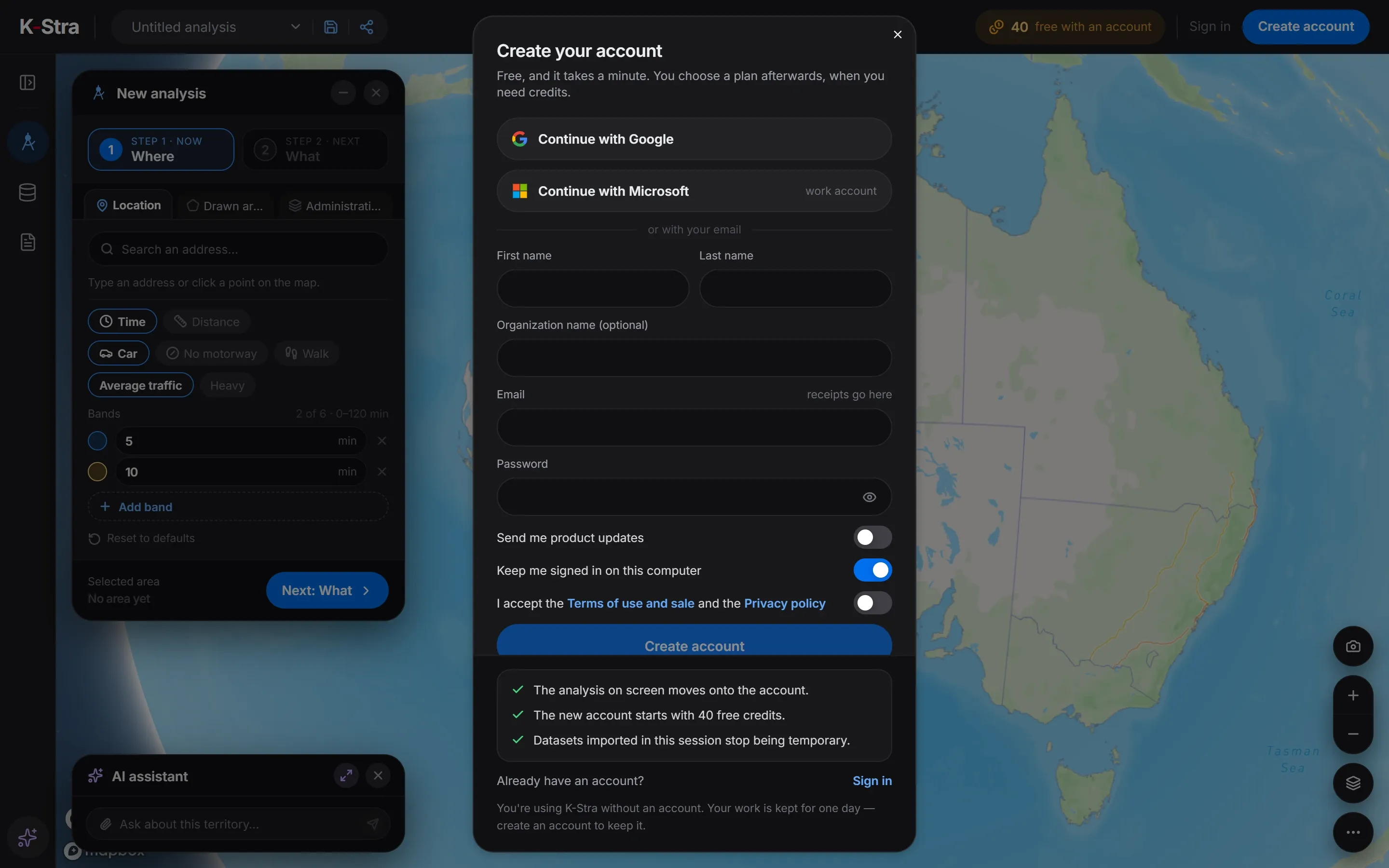 In the app
Click “Create account” at the top right. Choose “Continue with Google”, “Continue with Microsoft” or fill in the form with your name, an optional organisation name, your email and a password.
Open the sign-up window
In the app, click “Create account” at the top right of the screen.
Choose how to sign in
Use “Continue with Google”, “Continue with Microsoft”, or type first name, last name, email and a password of at least 10 characters.
Accept the terms
Turn on “I accept the Terms of use and sale and the Privacy policy”. It is never on by default.
Confirm your email
With email and password, open the confirmation link K-Stra sends you; it is valid for 3 days. Google and Microsoft accounts skip this step.
Sign in with the emailed code
At each sign-in with email and password, K-Stra emails a 6-digit code to type in. It is always on and cannot be switched off. Google and Microsoft sign-ins ask for no code, because the provider handles it.
How many free credits does a new account get?
Every new organisation receives 40 credits once, valid 12 months; inviting colleagues does not add more. A People & Economy analysis costs 2 credits per topic, so the welcome credits cover several first catchments.
Until the organisation buys its first pack or plan, the balance goes back to 20 credits at the start of each month whenever it is lower; the top-up lasts until the end of the month. It tops up to 20, it does not add 20.
What screen do I need to use K-Stra?
K-Stra is built for a computer screen of at least 1,280 pixels: the data panel, the side layout of the analysis panel and the docked assistant need that width. Below it the app still works, with panels opening as windows.
On a phone held upright below 950 pixels the app asks you to turn it sideways, and in landscape below 760 pixels it stops. System requirements lists browsers and company network settings.
Where are the main tools in the app?
The narrow bar on the left opens the four tools: “Analysis”, “My Data”, “Reports” and the “AI Assistant”. At the top are the analysis name, the save and share buttons, your credits and the account menu.
The welcome guide appears once per browser. You can open it again from the account menu, under “How K-Stra works”.
What else do people ask about getting started?
Do I need a credit card to sign up?
No. The account is free, starts with 40 credits and asks for payment details only when you buy credits.
Can I use K-Stra on a tablet or a phone?
K-Stra is a desktop product, built for a screen of at least 1,280 pixels. A tablet held sideways, at least 760 pixels wide, runs it with panels opening as windows. Upright below 950 pixels the app asks you to turn the device, and sideways below 760 pixels it stops, so on a phone use a computer instead.
Why did I not receive the confirmation email?
Check the spam folder first; the link is valid for 3 days. Signing up with Google or Microsoft needs no confirmation email.
Can I sign in with my company Microsoft account?
Yes. “Continue with Microsoft” signs you in with a Microsoft work account, with no K-Stra password to remember.
Open K-Stra
and try it yourself.
The map, address search and area dashboards work without an account; a free account adds credits for your first analyses.
Open the app — free to exploreBrowsing areas and their dashboards is free; you pay only for the analyses you run